 Get your head around key resources available to you at HYMS. Whether you just need a reminder of what’s available or you’re unsure what we have, the best place to start is the library website. The finding resources tab has all the usual suspects here: Medline from Ovid which is pretty much the Grandmaster Flash of medical databases (if medicine was hip hop). We’ve also got the Cochrane Library and while we’re bragging Embase too. But we’ve got so many great resources it would just be too cluttered to have them all there on the website. So, you need to use the cross search to get to the other good stuff like Acland’s Anatomy, New England Journal of Medicine or BMJ Journals. Remember that at HYMS you benefit from the resources of both the University of York and the University of Hull so make sure you are checking both catalogues with cross search. If there’s something that you think we should have but can’t find, let us know about it by emailing library@hyms.ac.uk
Showing posts with label MEDLINE. Show all posts
Showing posts with label MEDLINE. Show all posts
Thursday, January 19, 2017
Key Resources for HYMS students
Get your head around key resources available to you at HYMS. Whether you just need a reminder of what’s available or you’re unsure what we have, the best place to start is the library website. The finding resources tab has all the usual suspects here: Medline from Ovid which is pretty much the Grandmaster Flash of medical databases (if medicine was hip hop). We’ve also got the Cochrane Library and while we’re bragging Embase too. But we’ve got so many great resources it would just be too cluttered to have them all there on the website. So, you need to use the cross search to get to the other good stuff like Acland’s Anatomy, New England Journal of Medicine or BMJ Journals. Remember that at HYMS you benefit from the resources of both the University of York and the University of Hull so make sure you are checking both catalogues with cross search. If there’s something that you think we should have but can’t find, let us know about it by emailing library@hyms.ac.uk 

Monday, May 16, 2016
OSCE Information Search Revision Material

Tuesday, May 13, 2014
Save searches on the Ovid platform
Have you ever been doing research and thought, "I can't remember how I found that really useful article before?" Do you have a really good search strategy that you re-enter from scratch each time you use it? Save yourself some time by saving searches.
To do this in the Ovid platform (which includes the databases Embase and Medline), go to http://libguides.hull.ac.uk/medicine/FindArticles and follow the link to Medline and Embase.
Login with your York account.
Choose the database you want to use.
Go to My Account. If you do not already have a personal account in Ovid, create a personal account. If you do, sign in.
 Enter your search.
Once the search is complete, click save search history.
 Enter a name for the search and click save.
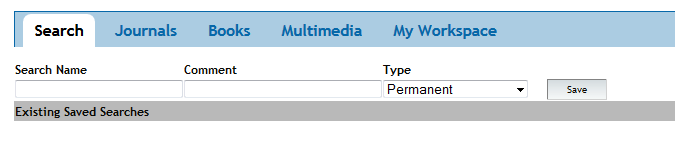 The search can be accessed from the My Searches and Alerts area in My Workspace.
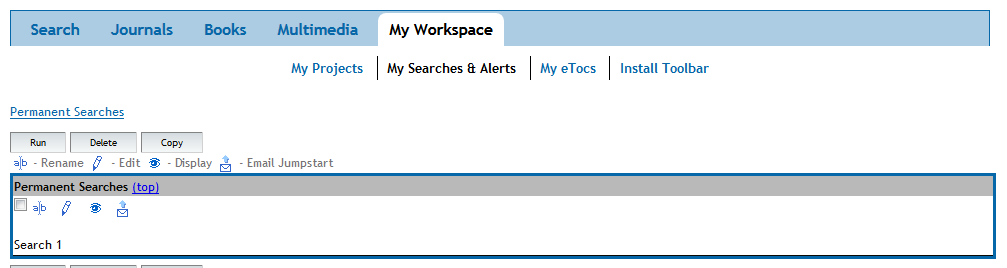 You can then re-run the search whenever you want!
To do this in the Ovid platform (which includes the databases Embase and Medline), go to http://libguides.hull.ac.uk/medicine/FindArticles and follow the link to Medline and Embase.
Login with your York account.
Choose the database you want to use.
Go to My Account. If you do not already have a personal account in Ovid, create a personal account. If you do, sign in.
Once the search is complete, click save search history.
Friday, January 4, 2013
Access Medline, Embase and many more via York
If you access Medline or Embase via York (as opposed to Hull) you can also access many other databases to help with your studies and broaden your medical horizons including:
As they are all provided by the same company (OvidSP) you can transfer your knowledge of and skills using Medline and Embase to the other databses.
Want a refresher on using Medline and Embase? Helpful materials can be found on the VLE:
HYMS For All 2012/3 > Information Literacy > Information Skills > Information Skills 2: Medline and Embase
- AMED (Allied and Contemporary Health Medicine)
- HMIC (Health Management Information Consortium)
- PsycINFO (useful for mental health topics)
As they are all provided by the same company (OvidSP) you can transfer your knowledge of and skills using Medline and Embase to the other databses.
Want a refresher on using Medline and Embase? Helpful materials can be found on the VLE:
HYMS For All 2012/3 > Information Literacy > Information Skills > Information Skills 2: Medline and Embase
Monday, October 22, 2012
Ovid Medline via Hull: Current issues 22 October 2012
We are experiencing issues with retrieving full text of articles via the Find it at Hull function in Ovid Medline at the moment. The University of Hull is investigating the issue and we will keep you updated on the situation. Access to database records appears to be unaffected but PDF full text access may be affected as well.
In the meantime you may wish to access Ovid Medline via the University of York, or if you note the details of the articles you are interested in, you can check whether electronic access is possible using the Find Journals by Title tab on the HYMS library webpages at http://libguides.hull.ac.uk/content.php?pid=206456&sid=1722001.
In the meantime you may wish to access Ovid Medline via the University of York, or if you note the details of the articles you are interested in, you can check whether electronic access is possible using the Find Journals by Title tab on the HYMS library webpages at http://libguides.hull.ac.uk/content.php?pid=206456&sid=1722001.
Subscribe to:
Posts (Atom)