
Showing posts with label Ovid Medline. Show all posts
Showing posts with label Ovid Medline. Show all posts
Monday, May 16, 2016
OSCE Information Search Revision Material


Tuesday, May 13, 2014
Save searches on the Ovid platform
Have you ever been doing research and thought, "I can't remember how I found that really useful article before?" Do you have a really good search strategy that you re-enter from scratch each time you use it? Save yourself some time by saving searches.
To do this in the Ovid platform (which includes the databases Embase and Medline), go to http://libguides.hull.ac.uk/medicine/FindArticles and follow the link to Medline and Embase.
Login with your York account.
Choose the database you want to use.
Go to My Account. If you do not already have a personal account in Ovid, create a personal account. If you do, sign in.
 Enter your search.
Once the search is complete, click save search history.
 Enter a name for the search and click save.
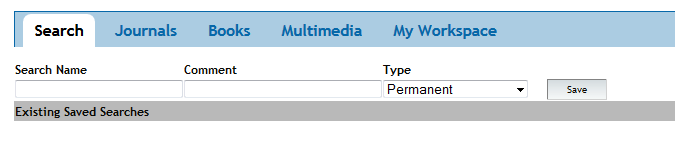 The search can be accessed from the My Searches and Alerts area in My Workspace.
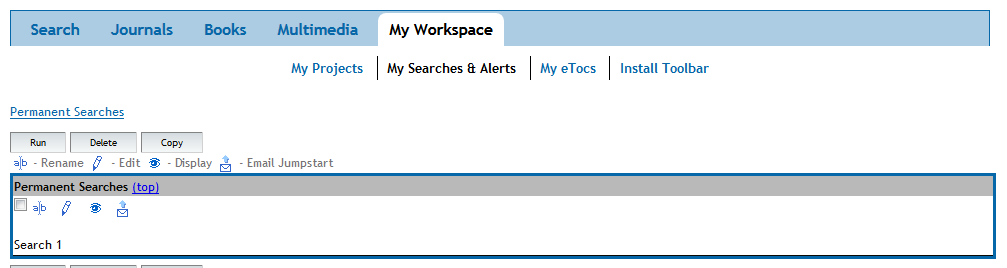 You can then re-run the search whenever you want!
To do this in the Ovid platform (which includes the databases Embase and Medline), go to http://libguides.hull.ac.uk/medicine/FindArticles and follow the link to Medline and Embase.
Login with your York account.
Choose the database you want to use.
Go to My Account. If you do not already have a personal account in Ovid, create a personal account. If you do, sign in.
Once the search is complete, click save search history.
Friday, January 18, 2013
Ovid Medline Database reload notification
We have received the following information regarding a recent Ovid Medline database reload:
Regards,
Timothy Curran
Vice President, Customer Support
Wolters Kluwer Health Medical Research - Ovid
After
the recent 2013 MEDLINE reload, an issue was found where links between the MeSH®
terms for the drug classes and the specific narrower drug terms in the
pharmacologic actions tree were disconnected during the global reload.
Customers utilizing the pharmacologic actions limit may need to run their saved
searches again once this issue has been resolved.
We
are currently working to resolve this issue as soon as possible and will notify
users when this has been corrected.
We
apologize for any inconvenience this issue may have caused you and your
patrons. If you should have any questions, please contact us at support@ovid.com.
Regards,
Timothy Curran
Vice President, Customer Support
Wolters Kluwer Health Medical Research - Ovid
Subscribe to:
Posts (Atom)